
Implementing simple methods reducing lag during online gaming is the primary priority for competitive players seeking a seamless experience in 2026. High latency, often referred to as lag, creates a noticeable delay between a player’s input and the action appearing on the screen, which can be devastating in fast-paced titles. Whether you are battling in a massive multiplayer arena or engaging in a tactical shooter, even a few milliseconds of jitter can disrupt your flow. By focusing on fundamental network optimizations and hardware adjustments, gamers can significantly decrease their ping and stabilize their connection. This guide explores professional strategies that address both software and hardware bottlenecks to ensure your gaming sessions remain fluid and uninterrupted. Understanding the underlying causes of network congestion allows you to apply targeted fixes that provide a tangible edge over opponents using standard out-of-the-box configurations.
Switch to a Wired Ethernet Connection
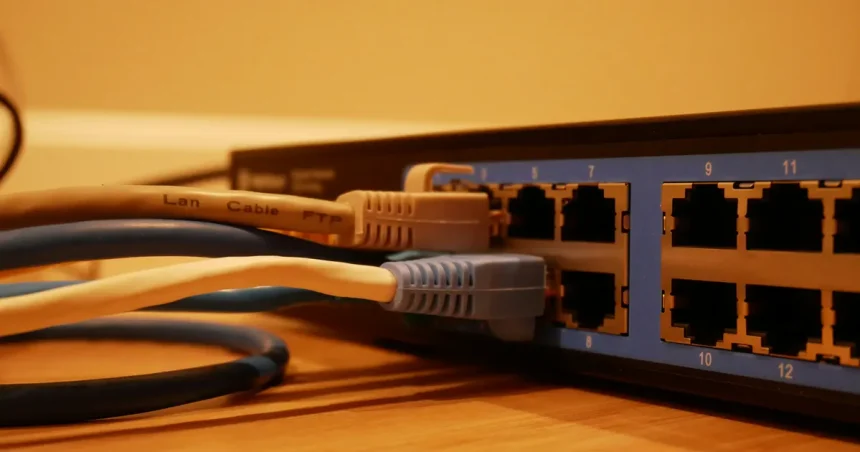
One of the most effective and simple methods reducing lag during online gaming involves moving away from wireless connections entirely. While Wi-Fi technology has improved significantly, it remains susceptible to environmental interference from walls, electronic devices, and even microwave ovens. A physical Ethernet cable provides a dedicated pathway for data, ensuring that packets travel directly from your router to your gaming console or PC without the risk of dropping. This stability is crucial for maintaining a low ping, as wired connections offer much lower signal fluctuation compared to even the most advanced mesh Wi-Fi systems currently available on the market.
To maximize the benefits of a wired setup, ensure you are using a high-quality Cat6 or Cat7 cable to support the high-speed data transfers required by modern 2026 gaming infrastructure. These cables are designed with superior shielding that prevents electromagnetic interference from degrading your signal quality over longer distances. By eliminating the inherent instability of wireless frequencies, you drastically reduce the occurrence of “rubber-banding” and sudden disconnects. For players who cannot easily run long cables through their homes, powerline adapters serve as a viable alternative, utilizing existing electrical wiring to deliver a more consistent connection than traditional Wi-Fi signals can provide.
Close High-Bandwidth Background Applications
Your internet connection is a finite resource that is shared among every application currently running on your device. Background processes such as cloud backups, operating system updates, and web browsers with dozens of open tabs can silently consume your available bandwidth, leading to significant spikes in latency. Before launching a competitive match, it is essential to open your system’s task manager and identify any non-essential software that is actively using the network. Closing these programs ensures that your game has exclusive access to your upload and download capacity, which is vital for maintaining a steady stream of data to the game server.
Streaming services and large file downloads are particularly notorious for causing lag because they prioritize data throughput over low latency. If other members of your household are watching high-definition videos or downloading large files while you play, your gaming performance will inevitably suffer. You should coordinate with other users or schedule large updates for times when you are not gaming to prevent network congestion. Using a tool like Speedtest by Ookla can help you verify if your current bandwidth is being throttled by hidden background tasks or external network traffic before you start a serious gaming session.
Update Network Drivers and Router Firmware
Outdated software is a common but often overlooked cause of network instability that can hinder your gaming performance. Manufacturers frequently release updates for network interface cards and routers to patch security vulnerabilities and optimize data processing efficiency. By keeping your network drivers current, you ensure that your hardware can communicate effectively with the latest gaming protocols and server architectures. This simple maintenance task can resolve compatibility issues that might otherwise cause intermittent lag or packet loss during high-intensity gameplay. Checking for updates once a month is a proactive habit that keeps your system running at peak performance.
Similarly, your router’s firmware acts as the operating system for your home network and requires regular attention to function correctly. Many modern routers offer an automated update feature, but manually checking the manufacturer’s website ensures you have the most stable version installed. Improved firmware often includes better traffic management algorithms that can more efficiently route gaming packets through your network. For those seeking even more control, third-party firmware options like DD-WRT can provide advanced enthusiasts with deeper customization settings. Ensuring your hardware is running the most refined code available is a cornerstone of any strategy involving simple methods reducing lag during online gaming.
Selecting the Best DNS Server for Gaming
The Domain Name System, or DNS, acts as the phonebook of the internet, translating web addresses into IP addresses that computers understand. While your internet service provider assigns a default DNS, these are often slow and inefficient for gaming purposes. Switching to a public DNS provider like Google DNS or Cloudflare can decrease the time it takes for your device to resolve server locations. This minor adjustment can shave several milliseconds off your total latency, providing a snappier feel to your online interactions. Most gaming platforms allow you to manually input these addresses within their network settings menu for an immediate performance boost.
Comparison of Connectivity Methods
Choosing the right connection type is essential for minimizing latency and ensuring a competitive edge. The following table compares the most common methods used by gamers in 2026 to help you identify the best solution for your specific home environment and hardware configuration.
| Connection Type | Latency Level | Stability | Ease of Setup |
|---|---|---|---|
| Ethernet (Cat6/7) | Ultra-Low | Maximum | Moderate |
| Wi-Fi 6E / 7 | Low to Medium | Variable | Very Easy |
| Powerline Adapter | Low | High | Easy |
| 5G Home Internet | Medium to High | Moderate | Very Easy |
As illustrated in the table, a wired Ethernet connection remains the gold standard for anyone serious about reducing lag. While newer Wi-Fi standards like Wi-Fi 7 offer impressive speeds, they still cannot match the inherent stability and low latency provided by a physical copper connection. Powerline adapters offer a middle ground, providing better stability than wireless without the need to drill holes for cables. When evaluating these options, consider the distance between your gaming station and the router, as well as the number of physical obstructions that could degrade a wireless signal. Choosing the most stable path for your data is a critical component of optimizing your overall gaming experience.
Optimize In-Game Settings and Graphics
While network issues are the most frequent cause of lag, hardware-induced latency can also play a significant role in how smooth a game feels. If your graphics settings are pushed beyond your hardware’s capabilities, your system may struggle to process frames quickly enough, resulting in “input lag.” Reducing settings such as shadows, anti-aliasing, and ambient occlusion can free up system resources, allowing your GPU and CPU to focus on processing game logic and network packets. Maintaining a high frame rate is essential because it reduces the time between your physical movement and the visual representation of that movement on the screen.
Furthermore, many modern games include specific settings designed to mitigate network latency, such as “Network Buffering” or “Client-Side Prediction.” Experimenting with these toggles can help align the game’s data processing with your specific connection quality. You should also ensure that your monitor’s refresh rate is correctly configured in your system settings to match its maximum capability. Using technologies like NVIDIA Reflex or AMD Anti-Lag can further synchronize your hardware components to minimize the delay between a mouse click and the resulting action. Balancing visual fidelity with performance is a key step in implementing simple methods reducing lag during online gaming effectively.
Enable Quality of Service Settings
Quality of Service, or QoS, is a powerful feature found in most modern routers that allows you to prioritize specific types of internet traffic. By enabling QoS, you can instruct your router to give gaming data priority over other types of traffic like file downloads or video streaming. This ensures that even if someone else in your home starts a heavy download, your gaming packets are moved to the front of the queue, preventing a spike in latency. This is one of the most effective simple methods reducing lag during online gaming for users who share a single internet connection with multiple people or devices. Setting this up usually requires accessing your router’s web interface and identifying your gaming console or PC’s MAC address.
According to experts at PCMag, properly configured QoS can virtually eliminate the “bufferbloat” that occurs when a router’s memory becomes overwhelmed by too many simultaneous requests. In 2026, many gaming-specific routers come with pre-configured profiles that automatically detect gaming traffic and apply the necessary prioritization without manual intervention. If your router does not have an automatic mode, you can manually set the upstream and downstream limits to about 80% of your total bandwidth. This overhead prevents the router from reaching its maximum capacity, which is often when latency spikes and packet loss occur. Taking the time to master your router’s traffic management tools provides a long-term solution to recurring lag issues.
Key Takeaways
- Switching to a wired Ethernet connection is the most reliable way to stabilize your ping and eliminate wireless interference.
- Closing background applications prevents non-essential software from consuming bandwidth needed for gaming data.
- Regularly updating your network drivers and router firmware ensures hardware compatibility with modern game servers.
- Changing your DNS settings to a provider like Cloudflare or Google can reduce the time spent resolving server addresses.
- Enabling Quality of Service (QoS) on your router prioritizes gaming traffic over other household internet usage.
- Lowering in-game graphical settings can reduce hardware-induced input lag for a smoother overall experience.
Frequently Asked Questions
What is the ideal ping for online gaming?
Generally, a ping under 50ms is considered excellent for most online games, while anything between 50ms and 100ms is playable but may result in slight delays. Once your latency exceeds 150ms, the lag becomes noticeable and can significantly impact your performance in competitive environments.
Can a VPN reduce lag while gaming?
In most cases, a VPN will actually increase your lag because it adds an extra hop for your data to travel through. However, if your ISP is poorly routing your traffic to a specific game server, a VPN might find a more efficient path, though this is a rare exception rather than the rule.
Does a faster download speed mean less lag?
Not necessarily, as lag is caused by latency (the speed of a single packet) rather than bandwidth (the total amount of data sent at once). You can have a gigabit connection and still experience high lag if your connection is unstable or if you are physically far from the game server.
How often should I restart my router?
Restarting your router once a week is a good practice to clear out cached data and refresh its connection to your ISP. This simple step can resolve minor software glitches that might be contributing to intermittent latency spikes during your gaming sessions.
Is Wi-Fi 6 better than Ethernet for gaming?
While Wi-Fi 6 and Wi-Fi 7 offer much faster speeds and better stability than older wireless standards, a wired Ethernet connection is still superior. Physical cables provide a more consistent signal with virtually no interference, which is the most important factor for reducing lag.
Conclusion
Mastering simple methods reducing lag during online gaming requires a combination of hardware discipline and software optimization. By transitioning to a wired connection, managing your bandwidth effectively, and fine-tuning your router settings, you can create an environment that favors low latency and high stability. As gaming technology continues to evolve in 2026, staying informed about the latest networking standards and optimization techniques will ensure you remain competitive. Consistency is the key to a lag-free experience, so take the time to implement these strategies and enjoy the seamless gameplay you deserve.